
Product Guide
WFH Is Back? How Malaysians Can Stay Productive During Uncertain Times
Apr
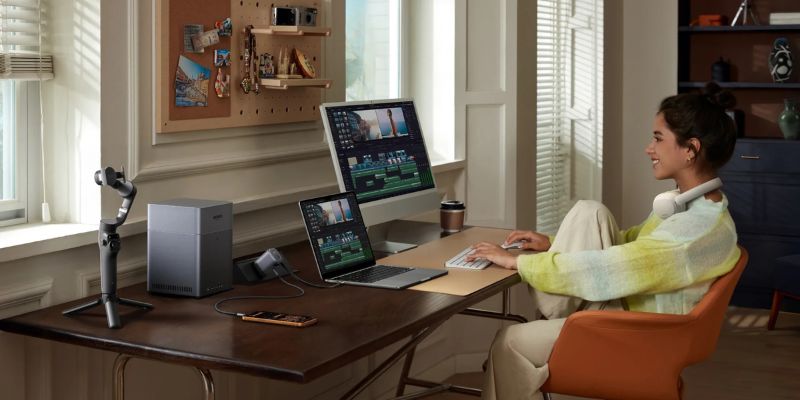
WFH setup Malaysia is becoming more relevant again as global uncertainty and rising fuel costs push businesses to rethink how work is done. The recent Iran–US conflict and energy concerns have led to discussions around work-from-home (WFH) policies in Malaysia, aiming to reduce commuting and manage operational costs. While this may help in the short term, it also raises concerns for SMEs and industries that rely on physical operations.
If WFH becomes more common again, are we actually prepared for it?
Why WFH Still Matters Today
WFH is no longer just about convenience. For many, building a proper WFH setup Malaysia is now essential to handle rising costs, maintain productivity, and adapt to hybrid work environments.
1. Rising Cost of Living and Fuel
With fluctuating fuel prices, commuting daily can become a significant expense. WFH helps reduce transport costs and gives employees more financial breathing room.
2. Business Continuity During Uncertainty
Global conflicts and economic shifts can disrupt normal operations. WFH allows companies to continue functioning even when external conditions are unstable.
3. Better Time Management
Removing commute time allows individuals to better manage their day—whether it’s work, family, or personal well-being.
4. Hybrid Work Is Becoming the Norm
Even if full WFH isn’t implemented, many companies are moving toward hybrid setups. This means your home workspace still plays an important role.
The Real Problem: Most Home Setups Are Not Ready
The biggest issue today is that most people do not have a proper WFH setup Malaysia, which leads to discomfort, slow workflow, and unnecessary frustration during daily tasks.
Common issues include:
- Limited laptop/pc ports for multiple devices
- Not enough power outlets or slow charging
- Poor wireless internet connection causing lag or disconnections
- Uncomfortable posture leading to wrist, neck, or back pain
- Cluttered workspace that reduces focus
These small frustrations add up and directly affect productivity.
The good news?
You don’t need an expensive overhaul. Small, practical upgrades can make a huge difference.
8 Essential WFH Upgrades That Actually Improve Productivity
To build a reliable WFH setup Malaysia, you don’t need a complete overhaul. These practical upgrades can improve comfort, connectivity, and efficiency immediately.
1. Ergonomic Comfort for Long Working Hours
UGREEN Vertical Ergonomic Wireless Mouse (RM59)

Long hours on a standard mouse can strain your wrist. This vertical mouse is designed with a natural 57° angle to reduce pressure and improve posture.
For anyone working 6–8 hours daily, this is not a luxury—it’s a necessity.
💡 Benefit: Less wrist pain, better long-term comfort
2. Expand Your PC/Laptop Instantly
UGREEN Uno 6-in-1 USB-C Hub (RM119)
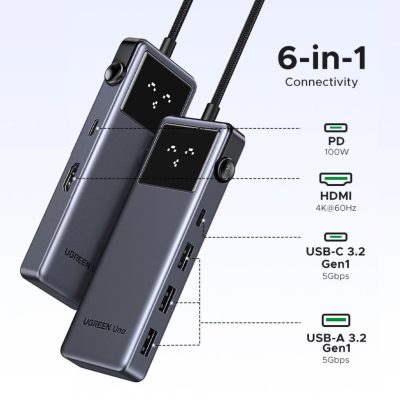
Modern laptops often come with limited ports. This hub solves that instantly by adding HDMI, USB ports, and power delivery in one compact device.
You can connect:
- External monitor
- Keyboard and mouse
- USB drives
- External Storage
💡 Benefit: Turns your laptop into a full workstation
3. Clean and Efficient Desk Setup
darkFlash GD68 Wireless Mechanical Keyboard (RM149)
UGREEN 61-Key Mechanical Keyboard (RM99)
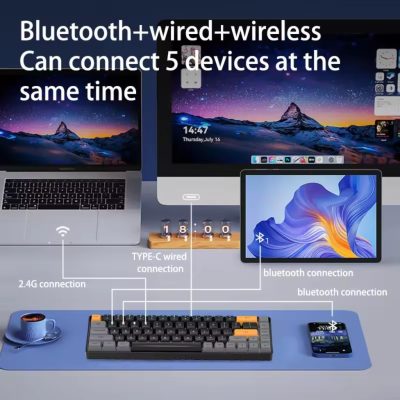
A good keyboard improves typing comfort and desk organisation. Compact layouts save space while maintaining functionality.
Wireless or minimal wired setups also reduce clutter significantly.
💡 Benefit: Cleaner desk, faster workflow, better typing experience
4. Focus Better and Reduce Distractions
UGREEN HiTune Max6 ANC Headphones (RM199)

Noise is one of the biggest challenges when working from home. Whether it’s family, traffic, or background noise, it breaks concentration.
Active Noise Cancelling (ANC) helps create a focused environment, especially during meetings or deep work sessions.
💡 Benefit: Better concentration, clearer calls, improved productivity
5. Stable Internet Is Non-Negotiable
TP-Link Archer TX35U Plus AX1800 Wi-Fi 6 USB Adapter (RM129)
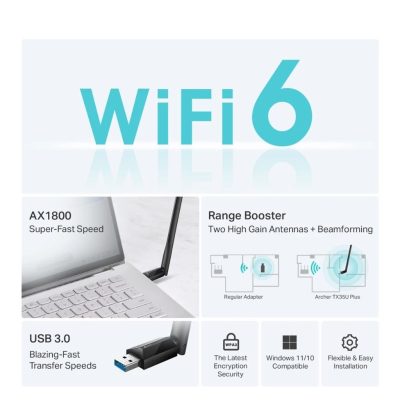
Unstable WiFi can ruin your entire workday—lagging calls, slow downloads, and dropped connections.
This high-gain WiFi 6 adapter improves signal strength and coverage, especially for desktops or weak laptop receivers.
✔️ Faster speeds
✔️ Better coverage
✔️ Stronger security (WPA3)
💡 Benefit: Smooth Zoom calls, faster uploads, stable connection
6. One Cable to Rule Them All
UGREEN USB4 240W USB-C Cable (RM59)
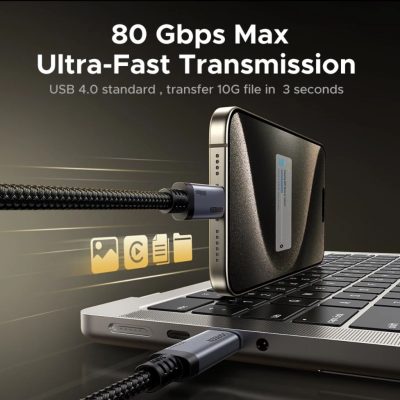
Instead of juggling multiple cables, this single cable handles:
- Charging
- Data transfer
- Display output
It supports high-speed data and even high-resolution display setups.
💡 Benefit: Less clutter, more efficiency
7. Reliable Power Anytime
UGREEN Nexode Pro 100W GaN Charger (RM199)
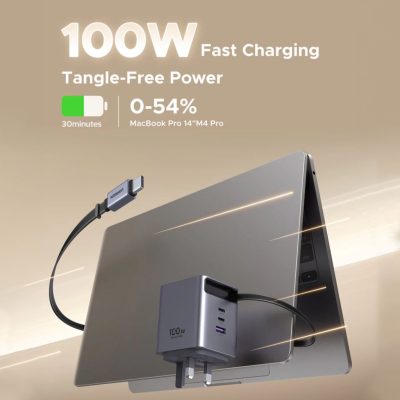
WFH often means multiple devices—laptop, phone, tablet. This compact charger powers up to three devices at once.
The built-in retractable cable also removes the need to carry extra wires.
💡 Benefit: One charger replaces multiple plugs
Additional WFH Upgrades Worth Considering
Beyond the essentials above, these can further improve your setup:
Ergonomic Chair
Supports your back during long hours and prevents fatigue
HD Webcam
Improves video quality during meetings and presentations
External Microphone
Ensures clear voice communication, especially for calls and recordings
These upgrades may seem small, but they significantly improve how you work daily.
Why These Upgrades Matter More Than You Think
WFH is not just about working remotely—it’s about working efficiently in a different environment.
A proper setup helps you:
- Stay productive without interruptions
- Reduce physical strain over time
- Keep your workspace clean and focused
- Avoid technical frustrations
- Maintain professional communication quality
Most importantly, it helps you stay consistent, which is critical in uncertain times.
WFH vs Office: It’s Not Either-Or Anymore
The future of work is not strictly office-based or fully remote. It’s flexible.
Some days you may be:
- At home
- In the office
- Working remotely while travelling
Your setup needs to support all scenarios.
This is why portable, efficient, and reliable tools are becoming more important than ever.
The Bottom Line
Whether temporary or long-term, having a proper WFH setup Malaysia ensures you stay productive, comfortable, and ready for any changes in work arrangements.
Instead of reacting when changes happen, it’s better to be prepared.
You don’t need a full expensive setup.
Start with small upgrades that improve:
- Comfort
- Connectivity
- Power
- Workflow
These changes can make a big difference in your daily productivity.
Visit Us to Try Before You Decide
💬 DM or WhatsApp us for recommendations based on your setup and budget
We’ll help you build a WFH setup that actually works for your needs—not oversell what you don’t need.
